Use the troubleshooting below for the following issues with Firmware Updates to DOF Reality Control Boxes
- Unable to connect to the DOF Reality Control Box
- Motion works strangely in games in 10 and 12-bit modes
- Unable to advance past Com Connect
- Firmware update froze during the installation
Unable to connect to the DOF Reality Control Box
If you are experiencing issues connecting to your DOF Reality Control Box after recently attempting a firmware update, please try the following steps:
- Download https://dofreality.com/tools.zip
- Unzip the tools into a folder on your computer
- Connect and press Full info
- Advise DOF Reality Technical Support of the information on the screen by either emailing support@dofreality.comor submitting a ticket via the button in the upper right of the Knowledge Base
- If you are unable to connect to the DOF Reality Control Box, open the Windows Device Manager and see if you're getting a COM port or HID device when you plug in the DOF Reality Control Box to a USB port.
Motion works strangely in games in 10 and 12-bit modes
If motion works, but performs, but performs strangely in games and in 10 and 12-bit modes, please try the following steps:
- Test motion in other games to verify it is not an issue with the motion profile in Sim Racing Studio
- If motion feels fine in other games, please use SRS motion tuning article to adjust your motion profile.
- When you go to SRS -> Setup -> Motion Test and move each axis gradually, does it move correctly?
- If not, try the steps below:
- Close the SRS app
- Set proper settings for SMC (as per Chapter 5.4 in the Instruction Manual for your platform) and open it
- Instruction Manuals for DOF Reality platforms can be found here: https://dofreality.com/instructions-manuals/
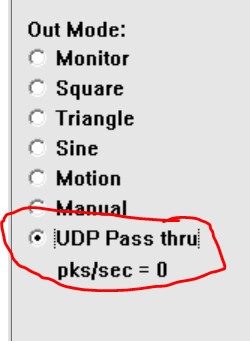
- Set it to UDP https://dofreality.com/wp-content/uploads/2020/11/SRSUDP.png
- Open SRS - it won't show the connected motion box - that's okay
- Go to the telemetry page of SRS and set it to ON
- Run your game etc
- Check and send us the SMC charts for the motor(s) in question to support@dofreality.comor submitting a ticket via the button in the upper right of the Knowledge Base
- The chart lines are mentioned here https://www.xsimulator.net/community/threads/smc3-arduino-3dof-motor-driver-and-windows-utilities.4957
Green is where the motor is, dark blue is where you want it to be via SRS.
Send us screenshots of SMC for that motor

Unable to advance past Com Connect
When using the dofreality.com/tools/ (http://dofreality.com/tools/) firmware update, you are unable to advance past Com Connect when selecting the BLACKPILL_F401CC option and then select Connect (it says Paired)
- If you are using Chrome, ensure have you provided Chrome permissions to connect to COM port and HID devices
- Try a different web browser to test if you are still unable to advance
- If still unable to advance, open the DOF Reality Tools and press Connect and press Full info
- Advise DOF Reality Technical Support of the information on the screen by either emailing support@dofreality.com or submitting a ticket via the button in the upper right of the Knowledge Base
Firmware update froze during the installation
- If the firmware update froze mid-install, try restarting the update.
- If the update is still not working, download the DOF Reality Tools from https://dofreality.com/tools.zip
- Open the DOF Reality Tools and press Connect and press Full info
- Advise DOF Reality Technical Support of the information on the screen by either emailing support@dofreality.com or submitting a ticket via the button in the upper right of the Knowledge Base
Was this article helpful?
That’s Great!
Thank you for your feedback
Sorry! We couldn't be helpful
Thank you for your feedback
Feedback sent
We appreciate your effort and will try to fix the article